Thursday, September 8

How to get all gallery image with resize of a product in magento

In product page you can get gallery image of the current product, But if you think to fetch all gallery image of a product in other page like cms page, then you have to write the code with little bit modification. The code should looks like below

load($id);
// Use your Product Id instead of $id
$countt = count($Products_one->getMediaGalleryImages());
if($countt>0){
foreach ($Products_one->getMediaGalleryImages() as $_image)
{
// For the Original Image
echo "url)." alt='' />";
//For gallery Image
$resizeimage = $obj->helper('catalog/image')->init($_product, 'thumbnail', $_image->getFile())->backgroundColor(242,242,243)->resize(400,300);
echo "";
}
} 


Hope it Helps... Thanks....

How to get category or subcategory postioned by the admin panel in magento

When we load a category it shows his subcategory according to the product id. If you wish to show category according to the order which you have in you admin panel then you have to fetch your category with little bit different style.See the below code in which I have fetched all subcategory with proper order

getStoreCategories();
foreach($category as $_category)
{
$catid = $_category->getId();
$parentCategory = Mage::getModel('catalog/category')->load($catid);
$childrenIdArray = explode(',',$parentCategory->getChildren());
if ($key = array_search($parentCategory->getId(),$childrenIdArray)) {
unset($childrenIdArray[$key]);
}
$collection = Mage::getModel('catalog/category')->getCollection()
->addAttributeToFilter('entity_id', array('in' => $childrenIdArray))
->addAttributeToSelect('*');

$sortedcategory = $collection->addOrderField('position')->getData();
foreach($sortedcategory as $sorted)
{
$_subcat = Mage::getModel('catalog/category')->load($sorted['entity_id']);
$subcatname = $_subcat->getName();
echo "

".$subcatname."

"; } } ?>


Hope it helps... Thanks.....

How to get all list of country in magento

Write the following script to any phtml file or template file you will get list of all the Country


Hope it Helps... Thanks.....

How to send Email in magento

Any body can send mail using php mail() function.But in magento all the functionality has wriiten you need to just send argument inside those functions. See the following script to send mail using magento function

setToName('Your Name');
$mail->setToEmail('Youe Email');
$mail->setBody('Mail Text / Mail Content');
$mail->setSubject('Mail Subject');
$mail->setFromEmail('Sender Mail Id');
$mail->setFromName("Msg to Show on Subject");
$mail->setType('html');// YOu can use Html or text as Mail format

try {
$mail->send();
Mage::getSingleton('core/session')->addSuccess('Your request has been sent');
$this->_redirect('');
}
catch (Exception $e) {
Mage::getSingleton('core/session')->addError('Unable to send.');
$this->_redirect('');
}
?> 

Hope it Helps... Thanks.....

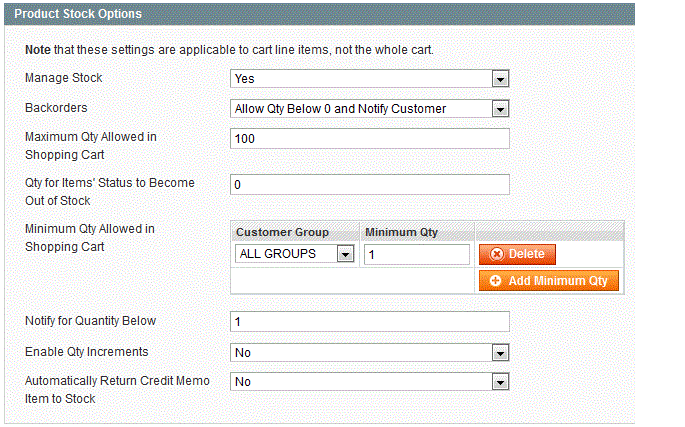
How to change default quantity on Magento Product Page

By default magento shows zero in the place of quantity text field in product details page, if you wish to change then just login to your admin panel go to System->Configuration->Catalog->inventory.

There, add your minimal quantity from Minimum Qty Allowed in Shopping Cart

See the below screenshot to make it more clear


Hope it Helps... Thanks....

How to remove validation on zip code in magento checkout page

In the World some of the country has no zip code like Ireland, But magento has default zip code validation to make that optional for specific country magento has added a new feature in admin panel. To make Zip code optional please follow the following steps.

Login to your your magento admin panel then go to System -> Configuration->General. From Country option tab you can see there is an option " Postal code is optional for the following countries " Select the country which you want to Optional/Not validate . then click on save config to save your settings. To be more clear on this please see the below screenshot.


Hope it Helps... Thanks....

How to change value and fetch value of Minimum Order Amounts of free shipping in magento

First of all to make Minimum Order Amounts of Free Shipping to [STORE VIEW] instead of [WEBSITE] then Go to app->code->core->Mage->Shipping->etc->System.xml
then change the value of to 1 under carriers -> groups -> freeshipping ->free_shipping_subtotal.

Now to fetch the value of the Minimum Order Amount according to store view write the below code


Hope it Helps.. Thanks...

How to get contact us email address in magento

Here’s the script to get Contacts email:


Or you can change it from admin -> System-> Configuration. From the left tab select Contacts then On the right side you will see Email Options Tab. From that tab you can see there is a field for send Emails To.Change th evalue to your require email address


Hope it Helps.. Thanks....

Wednesday, September 7

How to Remove the Coupon Code on the Shopping Cart in Magento

On Magento, on the Shopping Cart page, just before the checkout, by default, you have an area where customers can enter a coupon code. Obviously, if you’re running some kind of discount scheme, this is a vital area – however, if you’re not, it can actually take up a lot of much needed room during the checkout! For this reason, you might want to simply get rid!

Well, here’s how… just navigation through your FTP folders to: app/design/frontend/default/default/layout and in there you should see a file called checkout.xml.

Simply open it up and comment or delete the following line:


Problem solved!

Hope it Helps... Thanks....

How to Show Product Description on Magento Shopping Cart Page

Last week I was speaking to a Magento user, and he said he wanted to not only have the Product Title listed in the Magento Checkout, but also the short Product Description there. Most people would perhaps not have the neccessity to do so, however, for those that do want it done, there is a solution about.

If you go into FTP and navigate to /app/design/frontend/default/default/template/checkout/cart/item/default.phtml, you simply need to add the following around Line 27…

load($_item->getProductId());
            echo $custom->getShortDescription(); 
?>
this will successfully echo the short description for each product purchased.

Hope it Helps.. Thanks....